
This is what a crash from a Roku channel looks like when it reaches us:
RuntimeError(&hEC)  'Dot' Operator attempted with invalid BrightScript Component or interface reference.

1  labcrashnow   pkg:/components/LabScene.brs:171
2  onkeyevent    pkg:/components/LabScene.brs:123

-20.0 s  NAV  screen: Lab
+25.5 s  NAV  screen: DetailsScreen
+25.5 s  TAP  key OK
+27.0 s  TAP  key options
A runtime error, two frames, and the last four things the viewer did: opened the details screen, pressed OK, pressed the options key. Nobody was connected to the device over telnet.
We have just released the Roku SDK. This page is a run through its test channel: a test channel with ten scenarios, what each one produced in the dashboard, and the cases where a Roku crash log will still arrive without a stack.
Why Roku crash logs are hard to get
In day-to-day Roku app development, a device in developer mode prints the crash to the BrightScript debug console. You telnet to port 8085, read the backtrace, and inspect variables in the BrightScript debugger. That is Roku debugging as most channel developers know it, and it works well for the one device you are holding.
A published channel has none of that. When a viewer’s channel hits an uncaught runtime error, it exits to the home screen. There is no dialog, no console you can reach, and the process that could have sent a report is gone.
Roku does keep one thing. Since Roku OS 13.0, roAppManager.GetLastExitInfo() returns why the previous launch ended: an exit code such as EXIT_BRIGHTSCRIPT_CRASH, a timestamp, and a short tail of the console. Three limits shape everything that follows:
- It is only available on the next launch. A crash is reported when the viewer opens the channel again, which can be days later.
- Roku gives it only to the channel's own code. Called from inside a ComponentLibrary, it answers
EXIT_UNKNOWNwith no timestamp. An SDK loaded as a library cannot read it for you. - The console tail is 20 lines. It is frequently filled with beacon lines, so the frames you wanted are often not in it.
So there are two jobs. Read the exit record in Main() and hand it to something that can send it. And catch errors where they are thrown, so the stack does not depend on those 20 lines.
The setup: a channel built to crash
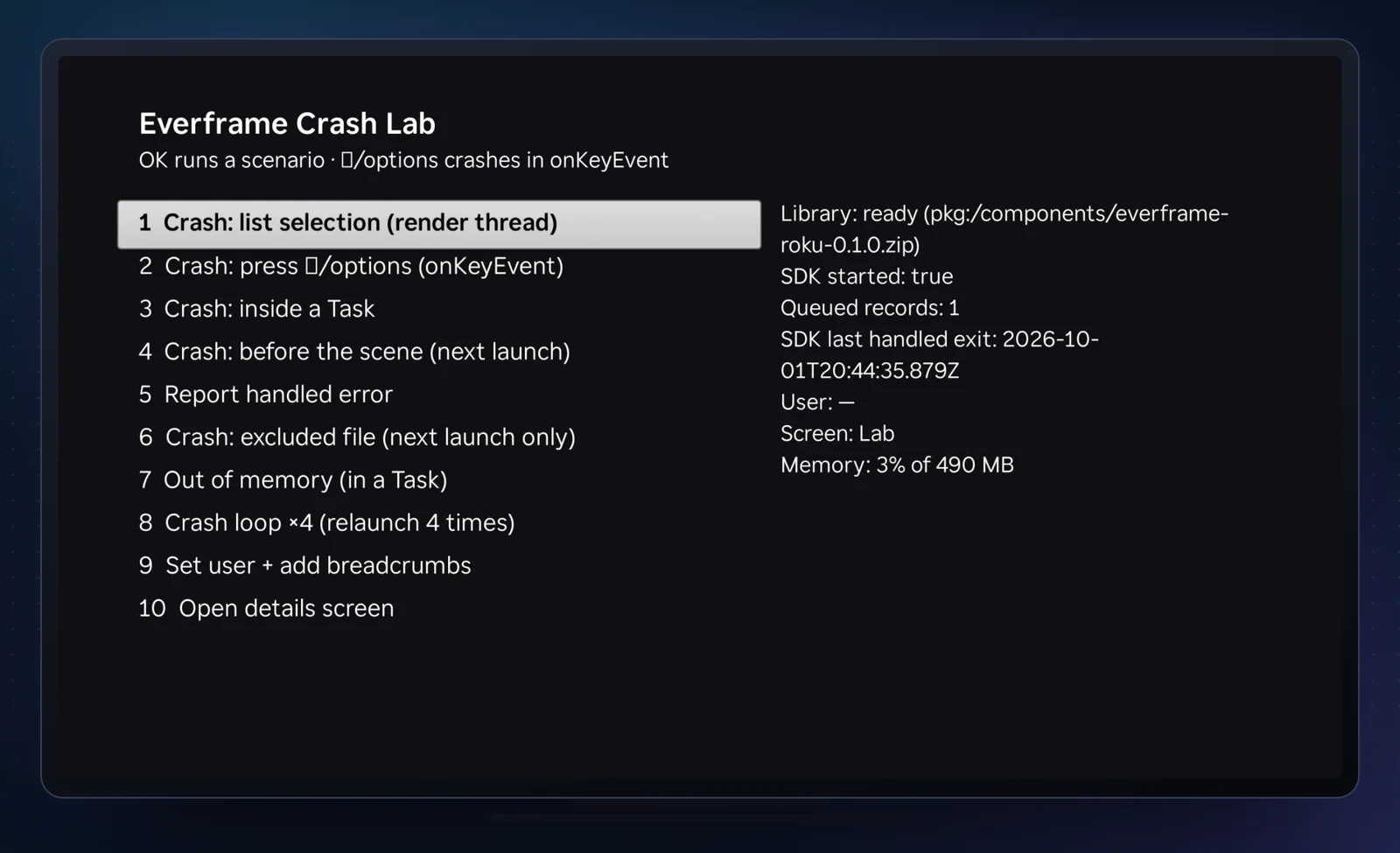
The test channel is examples/roku-channel in the SDK repository. It is a list of ten scenarios and a status panel. No content, no video.
The SDK is an npm package that carries a ComponentLibrary zip and a small CLI:
npm i -D @everframe/rokuThe scene declares the library and starts it once it has loaded:
<!-- MainScene.xml: <version> is the installed package version -->
<children>
  <ComponentLibrary id="Everframe" uri="pkg:/components/everframe-roku-<version>.zip" />
</children>
' MainScene.brs
sub init()
m.efLib = m.top.findNode("Everframe")
m.efLib.observeField("loadStatus", "onEverframeLoad")
' A bundled library can already be "ready" here; the observer only sees later changes.
onEverframeLoad()
end sub
sub onEverframeLoad()
if m.efLib.loadStatus <> "ready" or m.efStarted <> invalid then return
m.efStarted = true
ef = CreateObject("roSGNode", "Everframe:Everframe")
ef.callFunc("start", { sdkKey: "evf_live_..." })
end subThat much gives you captureException, breadcrumbs and a user. It does not yet detect a crash that ends the channel, because of the second limit above: the exit record has to be read by your own Main(). The install guide has those lines, about fifteen of them, which store the record in the registry for the SDK to pick up after start().
We did not paste them, because the build step adds them.
The build step that adds the stack
everframe-roku instrument ./ --out ./.everframe-build --bundle-libraryThis writes an instrumented copy of the channel to .everframe-build and leaves your sources alone. For the crash lab we added two --exclude flags, for Excluded.brs and OomTask.brs, to see what a crash looks like when nothing wraps it. It printed:
wrapped  source/main.brs  Main
wrapped  components/CrashTask.brs  init
wrapped  components/CrashTask.brs  crashInTask
wrapped  components/DetailsScreen.brs  init
wrapped  components/LabScene.brs  init
wrapped  components/LabScene.brs  onLibraryStatus
wrapped  components/LabScene.brs  onItemSelected
wrapped  components/LabScene.brs  onKeyEvent
wrapped  components/LabScene.brs  onStatusTick
wrapped  components/LabScene.brs  onLoopTick
screen   components/DetailsScreen.brs  DetailsScreen  via DetailsScreen
library  components/everframe-roku-1.2.0.zip
10 function(s) wrapped, 3 component(s) hooked, 1 screen(s) tracked
Each wrapped function body goes inside try ... catch e ... end try on the same source line. The catch records the error with its backtrace and re-throws the original exception. A crash that would have ended the channel still ends it, and an error your own code catches further up is still caught there.
Three things come with the wrapping: Main gets the exit-record lines, onKeyEvent leaves a breadcrumb per key press, and any component named *Screen, *View or *Page sets the current screen in its init(). That is where screen: DetailsScreen in the trail above came from. Nobody called setScreen.
Eight error groups
The scenarios ran on one Roku, with a relaunch after each crash. The dashboard grouped the results into eight errors.
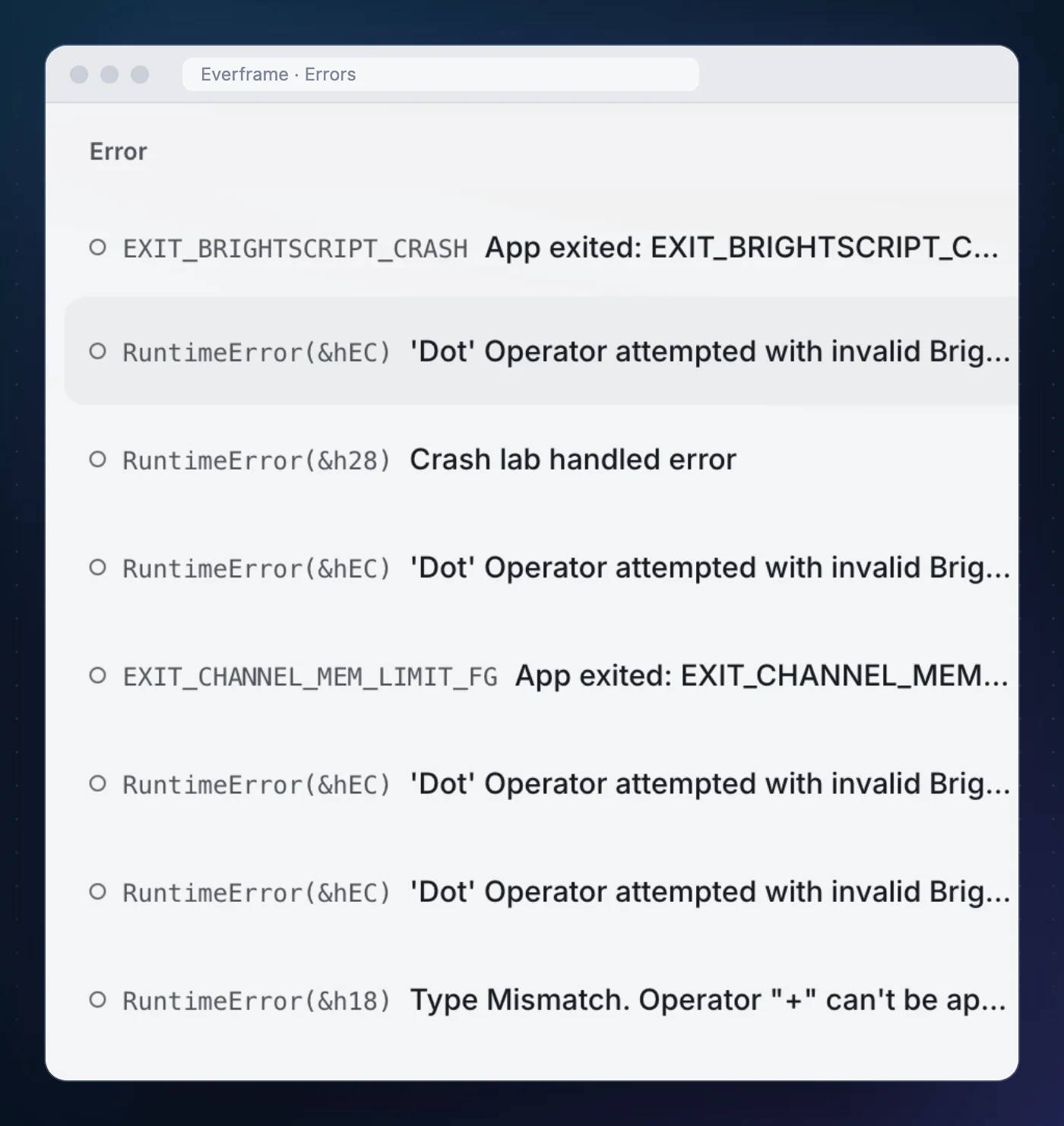
| Scenario | What arrived | Stack |
|---|---|---|
Options key in onKeyEvent | RuntimeError(&hEC), thread render, mechanism try-catch | labcrashnow ← onkeyevent |
| Crash inside a Task | RuntimeError(&hEC) | crashintask at CrashTask.brs:10 |
| Crash before the scene exists | RuntimeError(&hEC) | labcrashbeforescene ← main |
| Crash loop, four launches | RuntimeError(&hEC), 3 occurrences | labcrashnow ← onlooptick |
| Handled error | RuntimeError(&h28) “Crash lab handled error” | labreporthandled ← onitemselected |
| Crash in an excluded file | EXIT_BRIGHTSCRIPT_CRASH, mechanism exit-info | none |
| Out of memory in a Task | EXIT_CHANNEL_MEM_LIMIT_FG, mechanism exit-info | none |
| Not a scenario | RuntimeError(&h18) Type Mismatch | updatestatus ← onlibrarystatus |
The crash-loop row is the guard working. The scenario crashes on four consecutive launches. The device sends a given fingerprint once per launch and at most three times in a rolling hour, and the group shows three occurrences.
The last row was not on the list. More on it below.
Reading one crash
The report at the top of this page is the options-key scenario. In the lab, row 10 opens a second screen, and pressing the options key there calls a method on invalid.
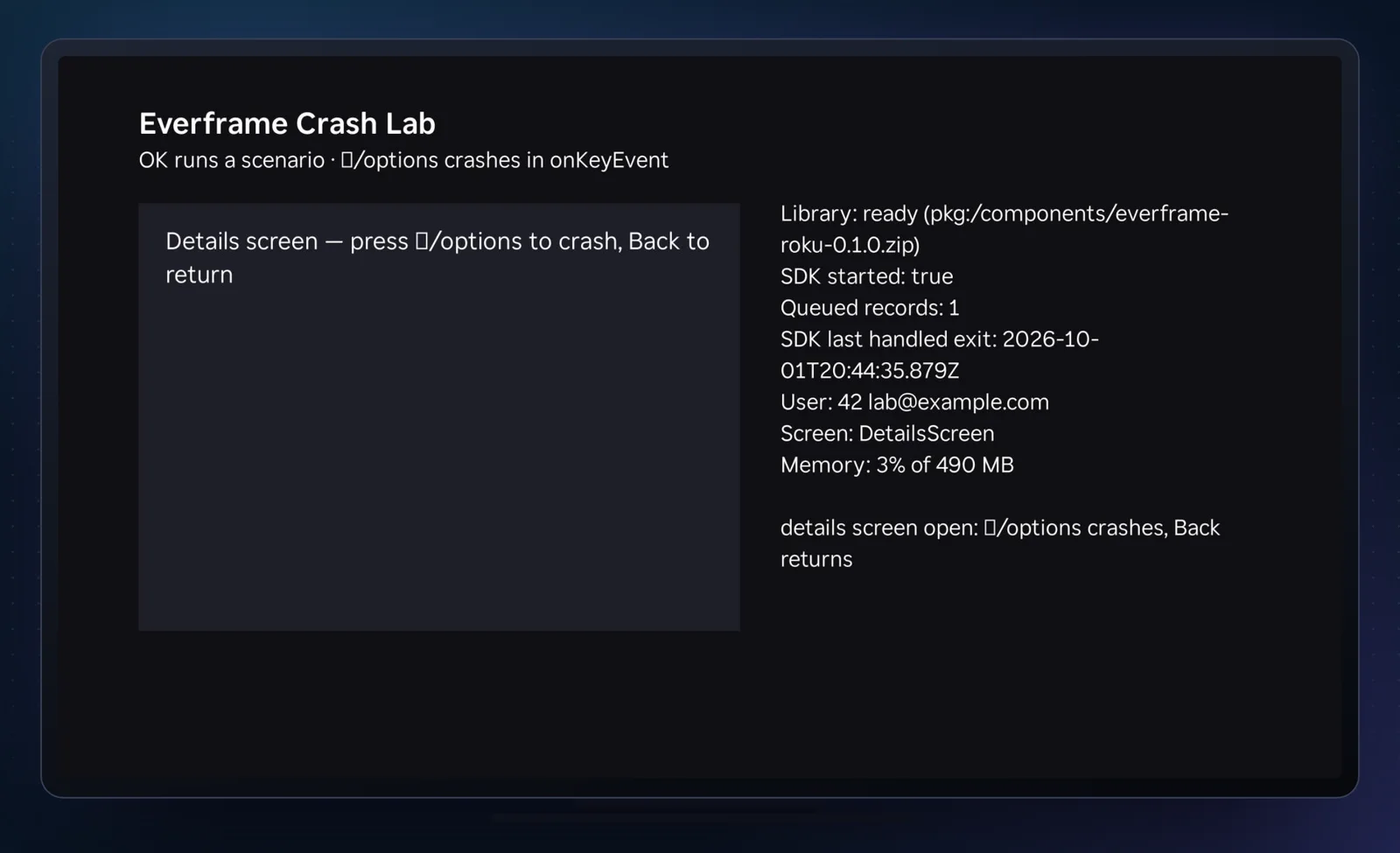
Screen: DetailsScreen, set by the instrumented init().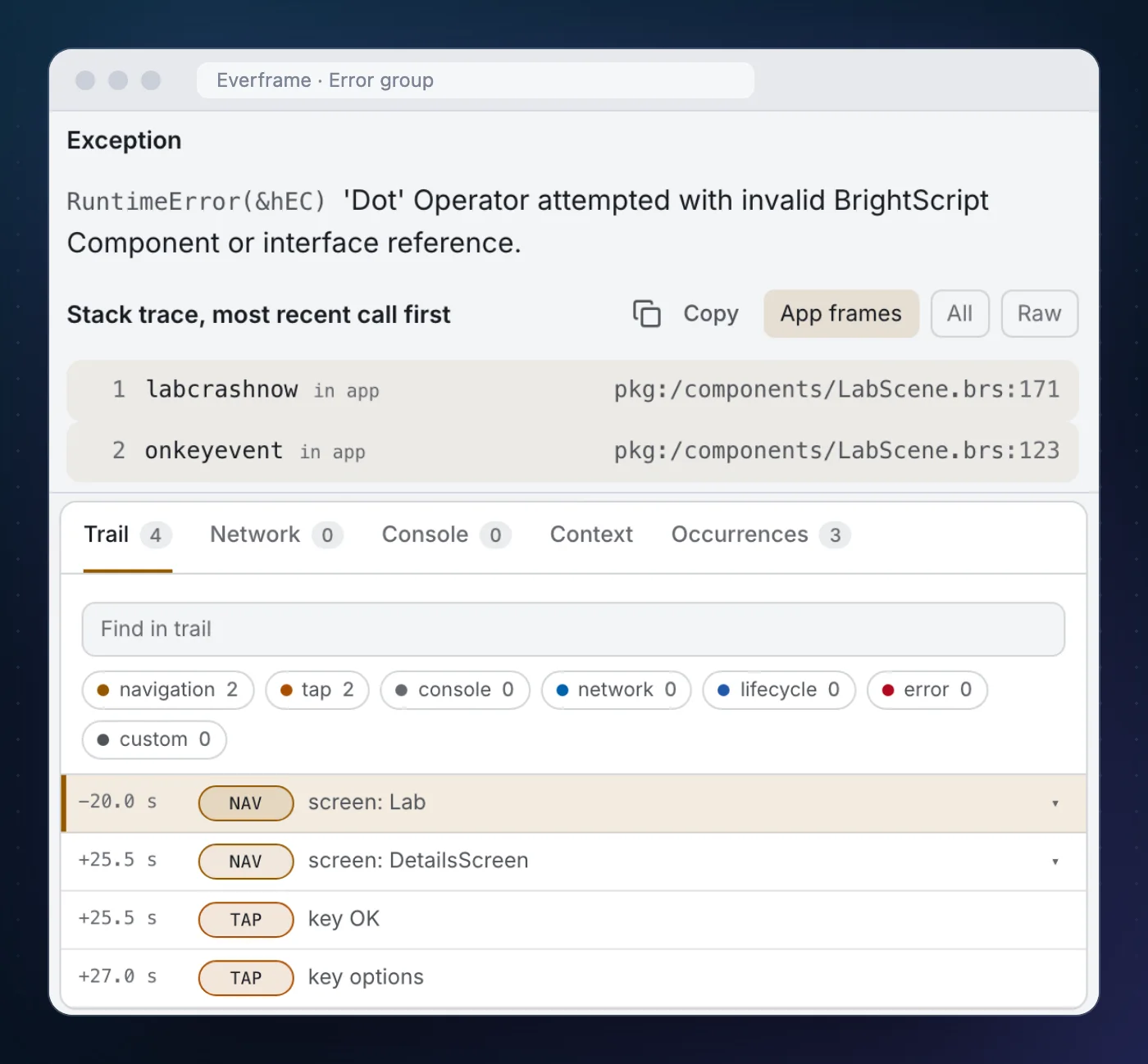
The Context tab fills in the rest. For this occurrence it read:
| Field | Value |
|---|---|
| Context | onKeyEvent (components/LabScene.brs) |
| Thread | render |
| Mechanism | try-catch |
| Route | DetailsScreen |
| Exit reason | App crashed (BrightScript error) EXIT_BRIGHTSCRIPT_CRASH |
Two mechanisms show up on one report here. The try-catch wrapper recorded the error when it was thrown. The channel then died, and on the next launch the exit record said EXIT_BRIGHTSCRIPT_CRASH. The SDK matches the two and files one report, not two. It matches them by kind, not by clock, because the device clock and the exit timestamp can differ by tens of seconds.
The same wrapper works off the render thread. The Task scenario arrived with a single frame, crashintask at pkg:/components/CrashTask.brs:10, and the crash in Main() arrived with labcrashbeforescene ← main, even though no Everframe node existed yet when it happened. The hook wrote the record straight to the registry and the launch after sent it.
Crashes that arrive without a stack
Row 6 crashes in Excluded.brs, one of the two files left out of instrumentation. Nothing catches the error. The only evidence is the exit record on the next launch.
That report has the exit code as its type, EXIT_BRIGHTSCRIPT_CRASH, and the dashboard says plainly: no stack trace on the latest occurrence. It still carried the trail (screen: Lab, key OK) and the route, because the SDK writes the latest 20 breadcrumbs and the current screen to the registry as it goes, and the next launch attaches the ones from the session that ended.
This is what every crash looks like if you skip the build step and add the Main() lines by hand. You learn that the channel crashed, on which screen and on which OS version. You do not reliably learn where. Skip both, and a crash that ends the channel is not reported at all. That is the argument for instrumenting release and beta builds.
Out of memory, with the reading before it
An out-of-memory kill never throws. The OS ends the channel. No try/catch can see it, so this one is exit-info only by nature.
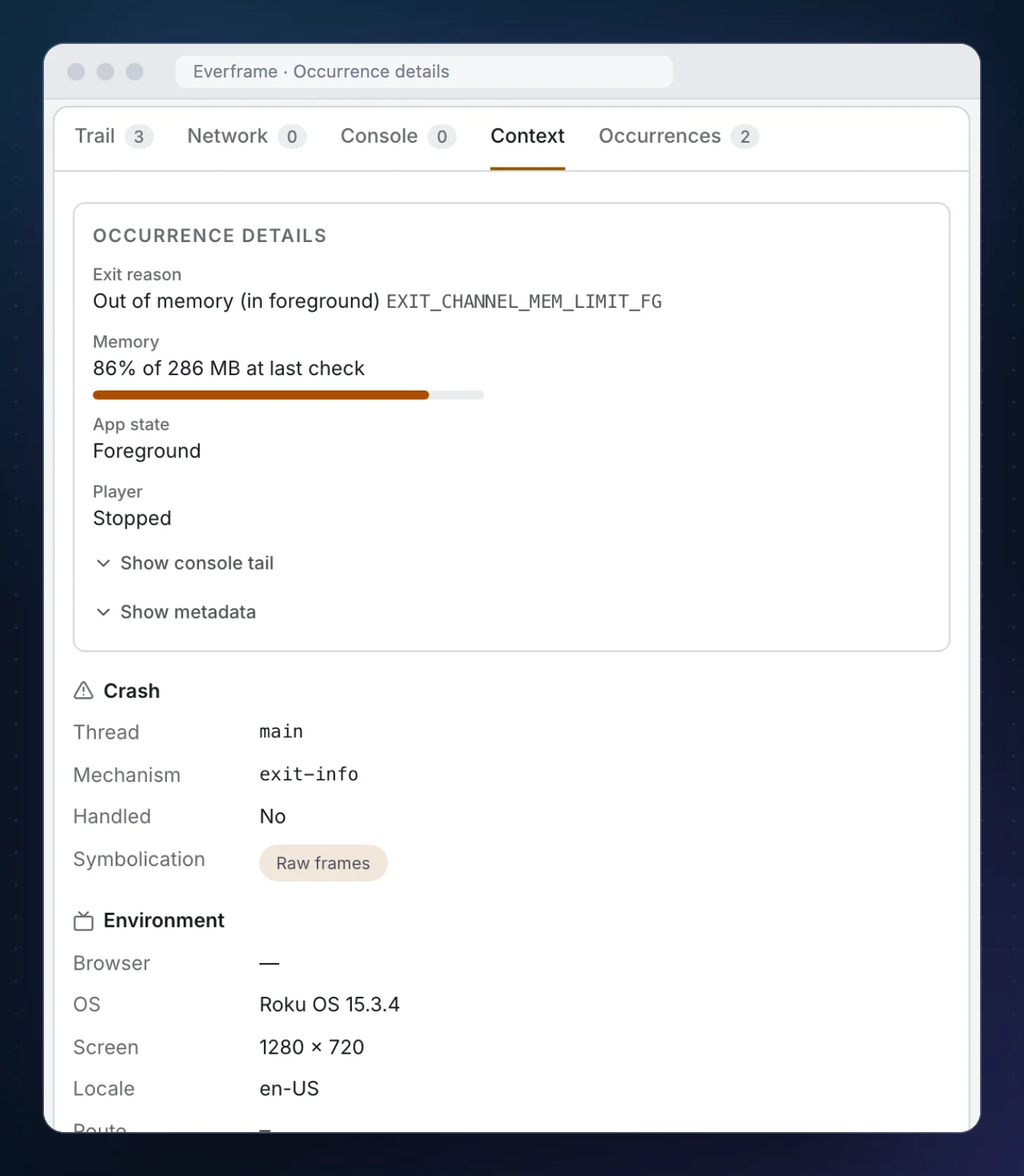
Where roAppMemoryMonitor is available, the SDK checks memory use every 5 seconds and leaves a breadcrumb the first time it crosses 75, 90 and 95 % of the channel’s limit, plus one for the OS warning event. Memory breadcrumbs are written to the registry at once, because the kill may follow within moments. The trail on this report was three lines:
CUSTOM  memory <n>% of <limit> MB
CUSTOM  memory warning from OS (<n>%)
CUSTOM  memory warning from OS (<n>%)
Three entries, then the kill. The lab allocates memory faster than a 5-second poll can follow, so a slower leak will give you more steps than this. The limit itself differs by device.
The crash we did not plan
The eighth group is RuntimeError(&h18), Type Mismatch. Operator "+" can't be applied to "String" and "Invalid"., with frames updatestatus ← onlibrarystatus.
That is not one of the ten rows. It is the lab’s own status panel, called from the library-status observer, concatenating a string with a value that was invalid. The channel written to test crash reporting had a real crash of its own, and it showed up in the dashboard next to the planned ones.
What it does not do
Roku is the one Everframe SDK that only reports crashes and errors. There is no in-channel reporter, no screenshot, no session replay, and no console or network capture. A viewer or tester cannot file a report from the channel. Network and playback breadcrumbs exist only if you add them with addBreadcrumb.
Other limits worth knowing before you ship it:
- Reports are late by design. A crash is sent when the channel is next opened.
occurredAtis the exit time andsubmittedAtcan be days after it. Order onoccurredAt. - Exit detection needs Roku OS 13.0. Older firmware has no
GetLastExitInfo. Instrumented try/catch works from Roku OS 9.4. - It changes the debugger. In an instrumented build the debugger stops on the wrapped function's
end sub, with the failing line's locals already gone. Keep development builds uninstrumented. - It uses the registry. Up to 6 queued reports, the breadcrumbs and the screen take about 14 KB of Roku's 16 KB. Budget your own registry data around that.
- Some functions are skipped. A function containing a
gotolabel cannot go inside a try block. The CLI lists every one it leaves alone.
What this run did not cover: the reports above came from one Roku model on one OS version, over a LAN, from a sideloaded build. We have not measured a published channel at volume, and the crash lab has no video playback in it.
If you are setting this up
- Install and start.
npm i -D @everframe/roku, declare the ComponentLibrary, callstart()when it is ready. See Install. - Run
instrument --dry-runfirst. It prints what would be wrapped and which components would be tracked as screens, and writes nothing. - Instrument release and beta deploys only. Point
roku-deployat.everframe-buildfrom inside that folder. See Build instrumentation. - Crash it once on purpose. Call a method on
invalidbehind a hidden key, relaunch, and check the group has frames. Then read Crash reporting for what each field means.
The SDK is MIT-licensed and on npm as @everframe/roku. The Roku SDK page lists what is and is not captured.