

Flutter bug reporting is three separate jobs, and most setups only do one of them. First, catch Dart errors with two handlers, FlutterError.onError and PlatformDispatcher.instance.onError. Second, send those errors and native crashes to a Flutter crash reporter such as Firebase Crashlytics or Sentry. Third, give testers and users a Flutter bug reporter, a screen they open themselves, for the bugs that never throw. A layout that renders wrong or a button that does nothing is invisible to the first two.
This guide covers each layer with the current documented setup, compares the in-app reporters that have a Flutter SDK, and ends with where reports should land, including how to file a bug in Flutter itself.
It is written for a Flutter app on Android and iOS, with notes where web differs. If you only need the Everframe setup, the worked run on an Android emulator is the shorter page.
Where each kind of failure goes
A Flutter app fails in more places than one handler can see. Here is where each kind of failure goes:
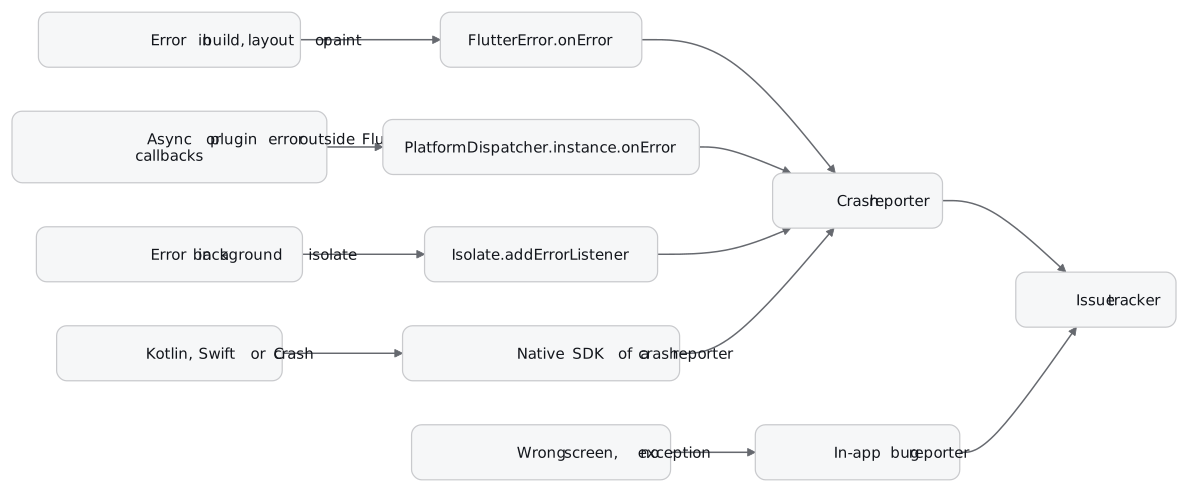
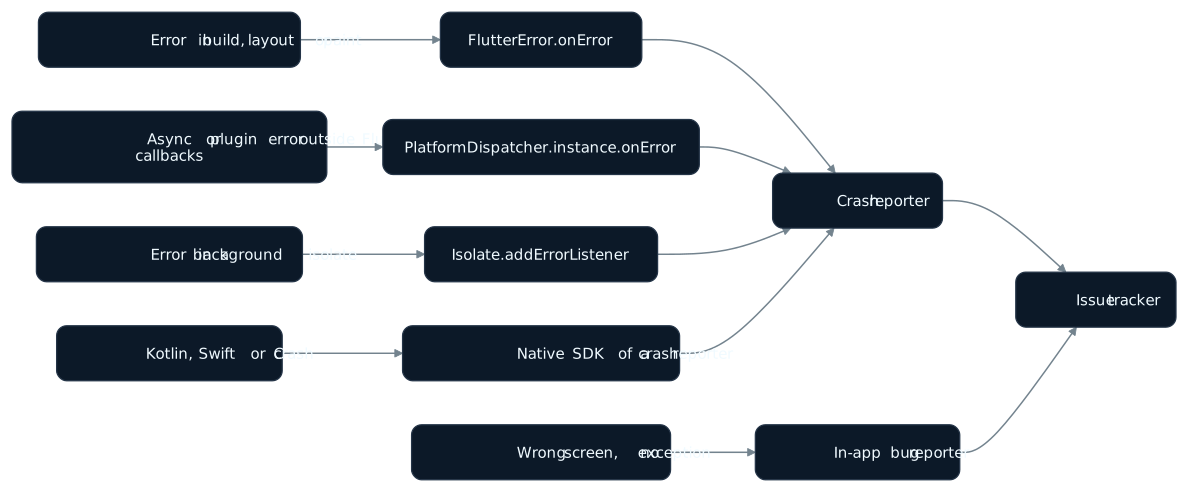
The left column is the part people skip. The first three rows are Dart, and you wire them yourself. The fourth needs a native SDK. The fifth needs a person.
Layer 1: Flutter error reporting with the framework’s own hooks
This is the main from Flutter’s current Handling errors page, which reflects Flutter 3.47:
Future<void> main() async {
  await myErrorsHandler.initialize();
  FlutterError.onError = (details) {
    FlutterError.presentError(details);
    myErrorsHandler.onErrorDetails(details);
  };
  PlatformDispatcher.instance.onError = (error, stack) {
    myErrorsHandler.onError(error, stack);
    return true;
  };
  runApp(const MyApp());
}
Every crash reporter’s Flutter setup is a variation of these lines with its own function in place of myErrorsHandler.
FlutterError.onError receives errors the framework catches during its own callbacks: build, layout and paint. By default it calls FlutterError.presentError, which dumps the error to the device logs. Flutter’s docs suggest keeping that call in your custom handler so you still see errors in the console.
PlatformDispatcher.instance.onError receives errors that happen without a Flutter callback on the stack. Flutter’s example is an onPressed handler that awaits MethodChannel.invokeMethod: if the plugin call throws, the error skips FlutterError.onError entirely and goes to the PlatformDispatcher. Return true to mark it handled. Return false and a fallback, such as printing to stderr, is used.
ErrorWidget.builder decides what appears in place of a widget that failed to build. By default debug mode shows a red error message and release mode shows a gray background. The Flutter docs set it inside MaterialApp.builder. It changes what users see. It does not report anything.
runZonedGuarded is the old answer
Older articles wrap runApp in runZonedGuarded. So did Flutter’s own page, until the Flutter 3.3 docs update on 30 August 2022 replaced it with PlatformDispatcher.instance.onError. The current page does not mention zones.
Some vendor docs still use the zone. Luciq’s automatic crash setup wraps runApp in runZonedGuarded and forwards FlutterError.onError into it. Bugfender’s finer-grained setup routes runZonedGuarded errors to its sendCrash. Both work. The gotcha is in the Dart API docs: asynchronous errors in futures never cross zone boundaries between zones with a different error zone. Initialise bindings in one zone and call runApp in another, and errors stop arriving where you expect them.
Isolates and native crashes are outside both hooks
PlatformDispatcher.onError covers the root isolate only. The API docs say errors in other isolates must be forwarded to it. The tool for that is Isolate.addErrorListener, and its messages are thin: a two-element list of Strings, the error’s toString and the stack trace as text. You do not get the original error object. Flutter’s docs also warn that an isolate can exit before the listener is attached, so spawn it paused, add the listener, then resume it. Crashlytics’ docs use Isolate.current.addErrorListener for errors outside the Flutter context.
Native crashes are the bigger gap. The PlatformDispatcher API docs state that the callback is not invoked for exceptions that terminate or freeze the VM or the process before it can run. A crash in Kotlin, Swift or C kills the process under your Dart code, and no Dart handler sees it. That is why the crash reporters below ship native SDKs alongside the Dart package.
Before you have any reporter, Flutter’s own tools still help. flutter logs reads the connected device’s logs. An iOS simulator crash writes a report to ~/Library/Logs/DiagnosticReports/, and an iOS device crash report lands in ~/Library/Logs/CrashReporter/MobileDevice.
Layer 2: a Flutter crash reporter
A crash reporter collects errors from every install without anyone doing anything, groups them and counts them. Two have the most documented Flutter setups.
Firebase Crashlytics
Install with flutter pub add firebase_crashlytics and flutter pub add firebase_analytics, then point the two handlers at it:
FlutterError.onError = FirebaseCrashlytics.instance.recordFlutterFatalError;
PlatformDispatcher.instance.onError = (error, stack) {
  FirebaseCrashlytics.instance.recordError(error, stack, fatal: true);
  return true;
};
Firebase’s docs say Crashlytics then monitors the app for crashes and, on Android, non-fatal errors and ANRs. Handled exceptions go through recordError from your catch blocks. The limits worth knowing before you rely on it: Crashlytics only stores the most recent eight recorded non-fatal exceptions, custom keys cap at 64 key-value pairs, and logs cap at 64kB per session, with older entries deleted. The current firebase_crashlytics is 6.0.1, published 23 October 2026.
Sentry
Sentry recommends its wizard, npx @sentry/wizard@latest -i flutter. It adds sentry_flutter and sentry_dart_plugin and patches main.dart with SentryFlutter.init. The SDK requires Flutter 3.44.0 and Dart 3.12.0 or later, Android API 26 or later, and iOS 15 with Swift Package Manager enabled.
Sentry documents more for Flutter than Crashlytics does. It tracks native crashes on Android (Java, Kotlin, C and C++) and iOS (Objective-C, Swift and C). It detects ANRs and app hangs. It attaches a screenshot and the view hierarchy to errors. Session Replay for Flutter is available on iOS and Android only. It also has a user feedback form, SentryFeedbackForm (SentryFeedbackWidget before 9.21.0), which collects a name, an email and a description, and lets the user take a screenshot of the app. The current sentry_flutter is 10.2.0, published 22 October 2026.
Which one: if the app already uses Firebase, Crashlytics is two handler lines away. If you want the screenshot, replay and feedback form in the same SDK as the crash data, Sentry documents all three for Flutter.
Obfuscated builds need their symbols
A release build made with --obfuscate produces stack traces nobody can read until the symbols are applied. Flutter’s command is:
flutter build apk --obfuscate --split-debug-info=out/androidObfuscation works only on release builds. It is supported for aar, apk, appbundle, ios, ios-framework, ipa, linux, macos, macos-framework and windows. Web apps do not support obfuscation. They can be minified instead. The build writes one symbols file per architecture, such as app.android-arm64.symbols, and Flutter’s docs tell you to back it up: lose it and that release’s traces stay unreadable. Locally, flutter symbolize -i <stack trace file> -d <symbols file> reads a trace. On Windows x64 the build writes a PDB instead, which flutter symbolize does not support.
Each reporter has its own upload step:
| Reporter | How Flutter symbols reach it |
|---|---|
| Firebase Crashlytics | Android: firebase crashlytics:symbols:upload --app=FIREBASE_APP_ID PATH/TO/symbols, before a crash is reported. Apple: dSYMs upload automatically on Flutter 3.12.0+ with plugin 3.3.4+. |
| Sentry | The Sentry Dart Plugin uploads symbol files for iOS, Android and Web. |
| Luciq | dart pub global activate luciq_cli, then luciq upload-symbols. |
Layer 3: a Flutter bug reporter users open themselves
A crash reporter answers “what threw”. It cannot answer “what did the person see”, because most bugs never throw. A wrong total, a blank list or a button that does nothing produces no exception for any hook to catch. A Flutter bug reporter is the screen a tester or user opens to file a Flutter bug report themselves, usually with a screenshot and a description, and whatever context the SDK collected.
Flutter makes one part of this harder than on native apps. Flutter draws its own widgets, so a native screenshot sees one surface of pixels, with no per-widget views to hide. That decides whether a tool can black out a password field. Gleap states it directly: its Flutter SDK cannot recognise password fields or black out single widgets in Flutter screens. Others work around it with a wrapper widget you place around private content.
These are the in-app reporters with a published Flutter package, and what their own documentation says each one captures. “Not documented” means the vendor’s Flutter docs do not mention it.
| Package | Latest on pub.dev | How it opens | Screenshot | Video or replay | Network | Console logs | Crashes | Platforms |
|---|---|---|---|---|---|---|---|---|
feedback | 3.2.0, Jul 2025 | Your code calls show | Annotated screenshot of the current page | Not documented | Not documented | Not documented | Not documented | Android, iOS, web (CanvasKit only), macOS, Windows, Linux |
| Wiredash | 2.6.1, May 2026 | Your code calls Wiredash.of(context).show() | Up to 3 per feedback | Not documented | Not documented | Not documented | Not documented | Android, iOS, web, macOS, Windows, Linux |
| Luciq (formerly Instabug) | 19.9.4, Sep 2026 | Shake by default; screenshot, floating button, two-finger swipe or manual | Yes; LuciqPrivateView blacks out widgets | Session replay | dart:io, http, dio adapters; up to 1,000 per report | Up to 1,000 statements | Dart and native crashes, ANRs, OOMs; release mode only | Android, iOS |
| Shake | 18.0.0, Oct 2026 | Shake by default; screenshot or floating button | Auto-attached; user can draw and blur | 15-second screen recording, off by default | ShakeHttpClient, dio, http extensions | Timeline attached by default | Not available | Android, iOS |
| Gleap | 19.3.1, Oct 2026 | Shake or screenshot, or from code | ”Mark the bug” opens an editable screenshot; left out of reports sent from code; cannot mask single widgets | Replay from periodic screenshots (beta, off for new projects); recordings on request at about 4 fps, up to 3 minutes | http, dio or manual; newest 30 kept | Includes print and debugPrint | Not documented | Android, iOS, web |
| Bugfender | 5.0.0, Jul 2026 | getUserFeedback() screen, or your own UI | Not documented | Not documented | Off by default; setNetworkLoggingEnabled(true) logs web fetch/XHR and iOS URLSession, and OkHttp or Ktor on Android with Bugfender’s interceptor | Remote logs you send, plus UI events and Android logcat | enableCrashReporting plus handleUncaughtErrors | Android, iOS, web |
| Everframe | everframe_flutter | Your code calls openReporter | Masked render-boundary screenshot | Bounded image replay, off by default | Explicit, origin only | No | Explicit Dart errors; native crashes from the native SDK | Android, iOS, web |
A few rows need more than a table cell.
The feedback package is a UI kit, not a service. You wrap the app in BetterFeedback and get a callback with the annotated screenshot and text. Where it goes is your code: ready-made uploads exist for GitLab issues (feedback_gitlab) and Sentry user feedback (feedback_sentry). For device details it points you to device_info_plus and package_info_plus. It is the right choice when you want screenshots in your own tracker and no new vendor. Its last release was 6 July 2025.
Wiredash is feedback plus promoter score surveys and analytics hosted in the EU. It collects metadata from the app, platform and user, and attaches your custom metadata to every feedback. It is free for up to 100,000 monthly active devices. It is built for “what do users think” more than “what broke”.
Luciq is the old Instabug, and the Flutter package changed with the name: its migration guide swaps instabug_flutter for luciq_flutter and the Instabug class for Luciq, starting from Instabug 16.0.0 or later. It is the most complete of these on paper. One reporter covers bug reports with repro steps, crash reporting with crash-free rates, session replay and network logs. Repro steps need LuciqNavigatorObserver in navigatorObservers and the root widget wrapped in LuciqWidget. That widget can also auto-mask labels, text inputs and media in screenshots, which is off by default. Crashes are reported only in release mode, and not while the device is connected to Xcode.
Shake marks crash reporting as not available in its Flutter feature table, and user actions tracking is not supported in Flutter. Its auto screen recording asks the user through a system dialog, and Shake’s own docs say to turn it off in production. What it does well is the ticket itself: automatic screenshot, drawing and blur, and a long list of device data attached by default, with emails, IP addresses, card numbers and bearer tokens redacted from network requests.
Gleap puts a “Mark the bug” button in its report form, which opens a screenshot of the current page in an editor; reports sent from code leave the screenshot out (Gleap). It can also ask the user for a screenshot or a recording when a workflow, an AI agent or a teammate requests one. App replays exist too, built from periodic screenshots by the native SDKs that Flutter wraps, but they are in beta, off for new projects, and Gleap says they are not yet recommended for production apps (Gleap). On Android it captures screens protected with FLAG_SECURE too. On Flutter web it relies on its JavaScript SDK, and page recordings on phones and tablets leave out canvas elements. That matters because Flutter web draws into a canvas.
Bugfender is remote logging first. Its feedback screen sends the session’s cached logs with the report, which suits “send us your logs” support flows. Bugfender says the Flutter plugin was provided by the community and is published as is.
If you need one rule: for testers on a debug build, choose by what the report captures. For production users, choose by how private content is kept out of the screenshot: a wrapper widget you place around it, automatic masking of whole widget types, or nothing at all.
Where the reports land: your Flutter bug tracker
Every tool above has its own inbox. None of them is where your team decides what to fix. That is the issue tracker, and the work is getting reports into it without duplicates.
- Crash groups, not crash events. A crash reporter groups thousands of events into one issue. Link the group to a ticket instead of filing one ticket per crash.
- One ticket per filed report. A report a person filed is one piece of evidence: what they saw, on which screen. It becomes a ticket, or is merged into one.
- Cross-link the two. When a filed report and a crash group describe the same bug, the ticket should carry both: the person's screenshot and the stack trace.
How each tool gets there varies. The feedback package leaves it to your callback, with a ready-made GitLab upload. Check each vendor’s integration list against your tracker before you pick one.
The other meaning: Flutter’s own bug tracker
If the bug is in Flutter itself, the Flutter bug tracker is GitHub. Flutter’s guide says to file framework crashes and bugs in flutter/flutter, and website problems in flutter/website. A Flutter bug report there should carry:
flutter create bug          # a minimal app that shows the problem
flutter doctor -v           # run in your project directory, paste the output
flutter <command> --verbose # only for problems with the flutter tool itself
The minimal app can also be a DartPad, or a separate repository when the reproduction needs native channels. For an exception thrown by the framework, include all the output between the dashed lines of the first one.
One more thing that turns up under “Flutter crash reporter”: the flutter command-line tool sends its own crash reports to Google unless analytics are disabled. Those reports cover the CLI’s code, not your app. flutter --disable-analytics opts out.
Where Everframe fits
Everframe is an in-app bug reporter, and the last row of the table. It is not a replacement for Crashlytics or Sentry. Run it beside one.
The everframe_flutter plugin is on pub.dev under the MIT license. It needs Flutter 3.47+ and Dart 3.13+, with Android API 24+ or iOS 15+, and has a web target. You put a RepaintBoundary around the content to report, wrap private widgets in EverframeSensitive, and call openReporter from your own button. Registered widgets are blacked out before the PNG is encoded. If the masking geometry is unavailable, no screenshot is taken at all. That is the Flutter masking problem from the section above, handled on the device. Optional image replay samples the same masked frames into a bounded buffer held in memory, and it is switched on per app in the dashboard. Device and app details come from the native host.
The native SDK underneath reports native crashes on its own. On Android that covers Java and Kotlin exceptions, plus native crashes and ANRs on Android 11 and later. On iOS it covers native crashes. Reports arrive in the dashboard, and go to any HTTPS receiver as a signed webhook. A coding agent can read them through the MCP server.
The plugin installs no automatic Dart error hook, no HTTP interception and no Dart console capture. Dart errors arrive only when you call captureException, network rows only when you call recordNetwork, which sends the method, the URL's origin, the status and the duration, and nothing else. You can forward FlutterError.onError and PlatformDispatcher.instance.onError to captureException, but we have not tested that wiring. Native platform views outside the Flutter boundary, such as a map, are not in the screenshot. Physical-device behaviour, production delivery and offline retry after a process restart have not been verified for the plugin.
Readable Dart stack frames show in the dashboard for handled errors. Obfuscated release builds have not been tested and are not expected to show readable frames.
To see every step on a real run, read the worked run of Flutter session replay and masked screenshots: the capture boundary, a masked report, replay and a Dart error as they arrived. The Flutter SDK page lists what is captured on each host.
The short version
- Today: set
FlutterError.onErrorandPlatformDispatcher.instance.onErrorinmain, and add an error listener to any isolate you spawn. - Before release: add a crash reporter with a native SDK, and wire its symbol upload into the same build step that runs
--split-debug-info. - Before testers: add a bug reporter, decide how private widgets are masked, and file one report yourself to check the screenshot.
- Always: make the issue tracker the one place where crash groups and filed reports meet.