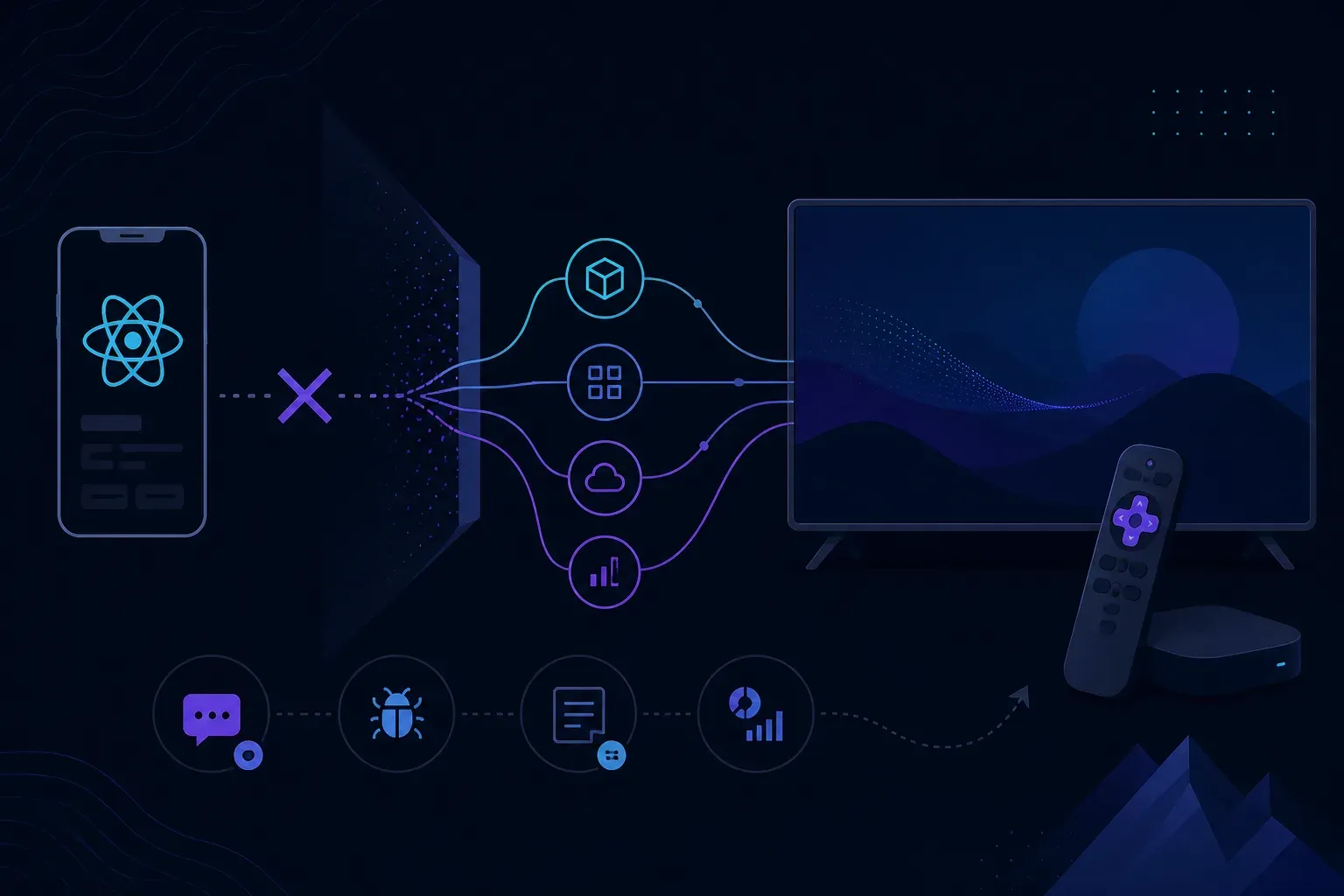
React Native on Roku is not an option. Roku’s own reference docs say BrightScript “is used to power all Roku apps” and SceneGraph “is the UI framework used to style all Roku apps”, and no React Native runtime runs on top of them. A team with a React Native app on phones, Apple TV and Android TV ships its Roku app as a second codebase in BrightScript and SceneGraph. What the two share is everything behind the screen: the API, the content feed, the business rules, the design.
This guide is for teams who already have a React Native app and have been asked for a Roku version. It covers what a Roku app is made of, what you can share with it, the tooling that makes the Roku side less foreign, and the TV platforms where React Native does run. If you already build in BrightScript, the Roku crash logs guide is the more useful page.
React Native on TV, platform by platform
| Platform | App framework | React Native route |
|---|---|---|
| Roku | BrightScript and SceneGraph | None |
| Apple TV | tvOS | react-native-tvos |
| Android TV | Android TV | react-native-tvos |
| Fire TV on Fire OS | Fire OS | react-native-tvos, which Amazon’s guide sets up through Expo |
| Fire TV on Vega OS | React Native for Vega, or web apps in Vega WebView | React Native for Vega, on React Native 0.72 or 0.83 |
| Samsung Tizen | Web applications, with .NET as a separate option | None: not a react-native-tvos or Expo TV target |
| LG webOS | Web apps, packaged or hosted | None: not a react-native-tvos or Expo TV target |
Two rows say “Fire TV” because Amazon now ships two operating systems under that name, and a React Native app needs a different route onto each. More on that below.
What a Roku app is made of
Roku’s developer docs put it in one line: creating a Roku app “involves two programming languages: SceneGraph and BrightScript.” SceneGraph is Roku’s proprietary, object-oriented XML framework. You declare screens and components in XML files. BrightScript is the scripting language that defines what the app does.
BrightScript is its own language, not a JavaScript dialect. Roku’s language reference says its statement syntax “is not C-like” and compares it to Python, Basic, Ruby or Lua. It compiles to bytecode that an interpreter runs, and that compilation happens every time a script is loaded.
The Hello World sample in Roku’s docs shows the shape of every app:
hello-world/
  manifest        app attributes and versioning
  source/         the main entry point
  components/     SceneGraph XML files that define the layout
  images/         splash screen and other artwork
You zip the contents of that directory, not the directory itself, and upload the zip to a device. If you searched for the “Roku channel SDK”, this is it: the developer-tools license you accept on the device says it “enables you to build apps with the Roku SDK and other developer tools.”
Developer mode and sideloading
A Roku device becomes a development target in four steps, per Roku’s setup guide:
- On the remote, press Home three times, Up twice, then Right, Left, Right, Left, Right.
- Note the device URL on screen and enable the Development Application Installer.
- Accept the Developer Tools License Agreement.
- Set a device password. The device reboots.
Then open the device URL in a browser, log in as rokudev with that password, and upload the zip. Roku’s sample also ships a makefile for doing it from a terminal:
export ROKU_DEV_TARGET=192.168.1.140   # your Roku's IP
export DEVPASSWORD=1234                # the password you set
make install
Only one app can be sideloaded at a time, so each upload replaces the last. When the build is ready to publish, the Application Packager on the same device page signs it and produces an encrypted package for the store.
What you share with the React Native app, and what you rewrite
React Native and Roku share no runtime. An agency write-up from March 2026 on porting a React Native Android TV module to Roku, by TO THE NEW, reports that React Native components cannot be reused and the UI logic has to be rebuilt rather than translated line by line. That matches what the platform docs imply. The useful question is where the line between the two codebases sits.
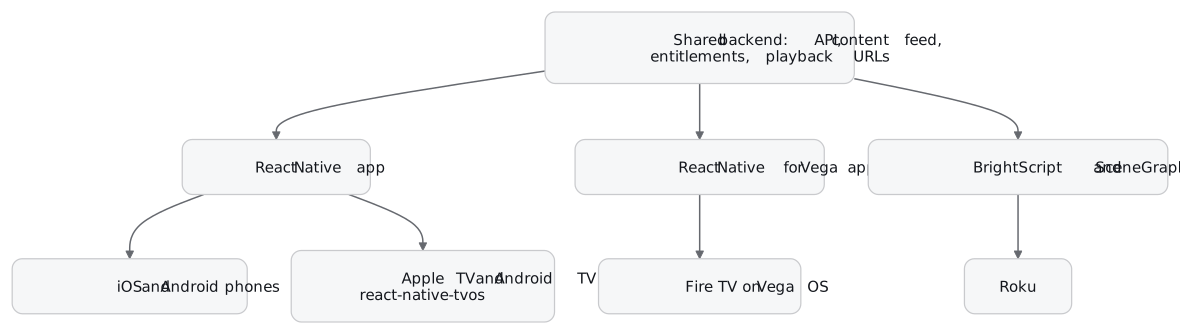
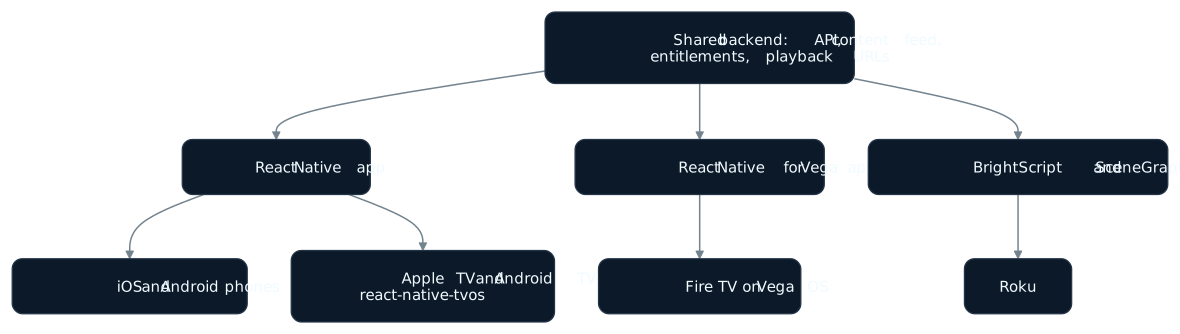
Share
The API and its contracts, the content feed, entitlement and playback rules, design tokens and artwork, analytics event names, and the test plan.
Rewrite
Every screen and component, navigation, remote focus handling, state management, the player wrapper, and the network layer.
That is the honest shape of any React Native Roku project: two apps, one backend. The practical consequence: push as much logic as you can to the server before you start the Roku build. Every rule that lives in a React hook today, such as which rail to show a signed-out viewer or when a trial has ended, is a rule you will write a second time in BrightScript if it stays on the client. A backend-for-frontend endpoint that returns the finished home screen as data costs one API change and saves writing that logic twice.
Keep the content model identical across both apps. If the React Native app and the Roku app read the same JSON feed, a content bug is one bug, not two, and QA can test it once.
Tooling that makes the Roku side less foreign
Two projects from RokuCommunity, both on GitHub, close some of the gap for a team used to TypeScript.
BrighterScript is “a superset of Roku’s BrightScript language” that compiles to standard BrightScript. It adds classes, namespaces, import statements, a ternary operator and template strings, which are the features a JavaScript developer misses first. It installs from npm:
npm install brighterscript -gThe latest release on npm is 0.73.8, published on 22 October 2026, with a 1.0.0 alpha on the next tag.
The BrightScript Language extension for VS Code, also from RokuCommunity, sideloads directly to a Roku device from the editor, debugs with breakpoints and variable inspection, and checks errors with the BrighterScript language server. For a team whose editor is already VS Code, it replaces the browser upload for day-to-day work.
Neither changes the runtime. You are still writing for SceneGraph, and Roku’s threading model still applies.
What breaks on Roku that a React Native developer won’t expect
Blocking the render thread ends the app. Roku’s docs say the render thread performs all rendering, and if it blocks, the app is terminated. A synchronous network call or a heavy parse in a UI component is not a dropped frame here. Blocking work goes in a Task node, which runs on its own thread, and a Task node can have only one active Task thread at a time.
One sideloaded build per device. Roku allows one sideloaded app at a time, so a team that wants a staging build and a feature build installed at once needs two test Rokus.
Your npm dependencies stay behind. A React Native app leans on packages for analytics, ads, auth and the player. None of them carry over, so each one needs a BrightScript equivalent from its vendor, or a server-side replacement, before the Roku build can match the phone app.
Where React Native does run on TV
Apple TV and Android TV: react-native-tvos
react-native-tvos is “a full fork of the main repository, with only the changes needed to support Apple TV and Android TV.” The goal it states is that existing apps work on TV with few or no changes to the JavaScript. Recent releases need tvOS 15.1 and Android API level 24 at minimum, and 0.88.0-0 was published to npm on 17 October 2026.
A new app starts from its TV template:
npx @react-native-community/cli@latest init TVTest --template @react-native-tvos/template-tvThe README says the core team recommends Expo for new projects. Expo’s TV guide says React Native is supported on Android TV and Apple TV through the React Native TV project: add the @react-native-tvos/config-tv plugin and set EXPO_TV=1. Apple TV builds need Xcode 16 or later and the tvOS 17 SDK. Roku is on neither list.
Fire TV on Fire OS
Amazon’s Fire TV guide says “Amazon Fire TV supports React Native” and uses react-native-tvos through Expo. Its example creates a project with npx create-expo-app FireTVDemo -e with-tv, sets isTV to true, and runs it on a Fire TV over ADB with npx expo run:android. If you already have an Android TV build from react-native-tvos, Fire OS uses the same project.
Fire TV on Vega OS: React Native for Vega
Amazon announced Vega OS on 30 September 2025, calling it “a new operating system built specifically for our devices.” The Fire TV Stick 4K Select was the first device to run it. Vega OS React Native apps are built with React Native for Vega; the other route is web technologies in Vega WebView. The announcement said: “We’re using React Native 0.72.”
Amazon’s React Native for Vega docs now say it “currently supports RN 0.72 and RN 0.83 with the new architecture.” It includes the TV focus pieces from React Native tvOS, TVFocusGuideView and TVEventHandler. Tooling is Vega Studio, a VS Code extension, plus the Vega CLI, the Vega Virtual Device simulator and the VDA command-line tool for real devices.
This is the closest thing to “React Native for Roku” that exists: a streaming-stick operating system whose native app framework is React Native. It is not a way onto Roku. Amazon also says it continues to launch devices on Fire OS, so a Fire TV strategy now means two builds: react-native-tvos for Fire OS and React Native for Vega for Vega OS, each pinned to its own React Native version.
The history: React Native on Roku in 2019
In May 2019 Redbox announced its Roku app as “the first in market to be developed for Roku using” React Native, built with You.i TV’s cross-platform SDK. WarnerMedia completed its acquisition of You.i TV in December 2020 to help launch HBO Max. Light Reading wrote at the time: “It’s not yet clear whether You.i TV will still pursue deals outside the AT&T/WarnerMedia universe.”
Treat that as history, not a plan. If a vendor offers you React Native on Roku today, ask to install a current build on your own device in developer mode before you design around it.
Crash and error reports from each of those apps
Once the Roku app is its own codebase, its failures need their own tooling too. Everframe has an SDK for each of the runtimes in the diagram above, and each one does a different amount.
On Roku, the Roku SDK reports crashes, out-of-memory kills and runtime errors from BrightScript and SceneGraph apps. A crashed app cannot send anything, so the report is filed on the next launch, with the breadcrumbs and screen from the session that ended. With the build step, errors also carry a stack.
On iOS, Android, Apple TV and Android TV, the React Native SDK covers React Native apps, including react-native-tvos 0.85 and later. On phones it adds the in-app reporter, screenshot and replay. On a TV there is no on-screen reporter; crashes and errors report on their own, and on Android TV a linked test device files a quick capture with a remote gesture.
On Vega OS, the Everframe SDK is a preview that reports JavaScript errors only: uncaught errors, promise rejections and errors you pass to it. Native and C++ crashes never reach it, and there is no reporter, screenshot or replay. The React Native SDK cannot be used in a Vega OS app, because it needs React Native 0.84 or later and its own native module. See Vega OS.
On Roku, Everframe is crash and error reporting only. There is no reporter, no screenshot and no session replay, so a tester cannot file a bug from the TV with a picture of what they saw. If your QA process depends on that on Roku, Everframe does not cover it.
The report from each SDK is the same envelope, so a Roku crash and a React Native crash appear together in the Errors inbox and use the same signed webhook format. The receiver you write for one handles both. The Roku crash logs guide walks through a test app’s crashes and the reports each one produced.